
For many U.S. home buyers, the first set of listing images strongly influences whether a property deserves closer attention. The way a room is presented influences how its size, layout, and function are understood. Empty interiors can feel abstract, while lived in spaces may distract from the structure itself. This gap between space and perception is why virtual staging software has moved from a design option to a practical listing tool. It helps translate floor area into usable living space without changing the property or slowing down the marketing timeline.
Performance data supports this shift. Aggregated U.S. real estate marketing research shows that high quality staged images receive up to 60% more views than unstaged listings. With buyer attention shaped online, virtual staging software plays a direct role in how listings are evaluated, compared, and shortlisted across U.S. property platforms.
Also Read: What are the Common Mistakes to Avoid in Virtual Home Staging?
What Is Virtual Staging Software?
What the Tool Is Used For
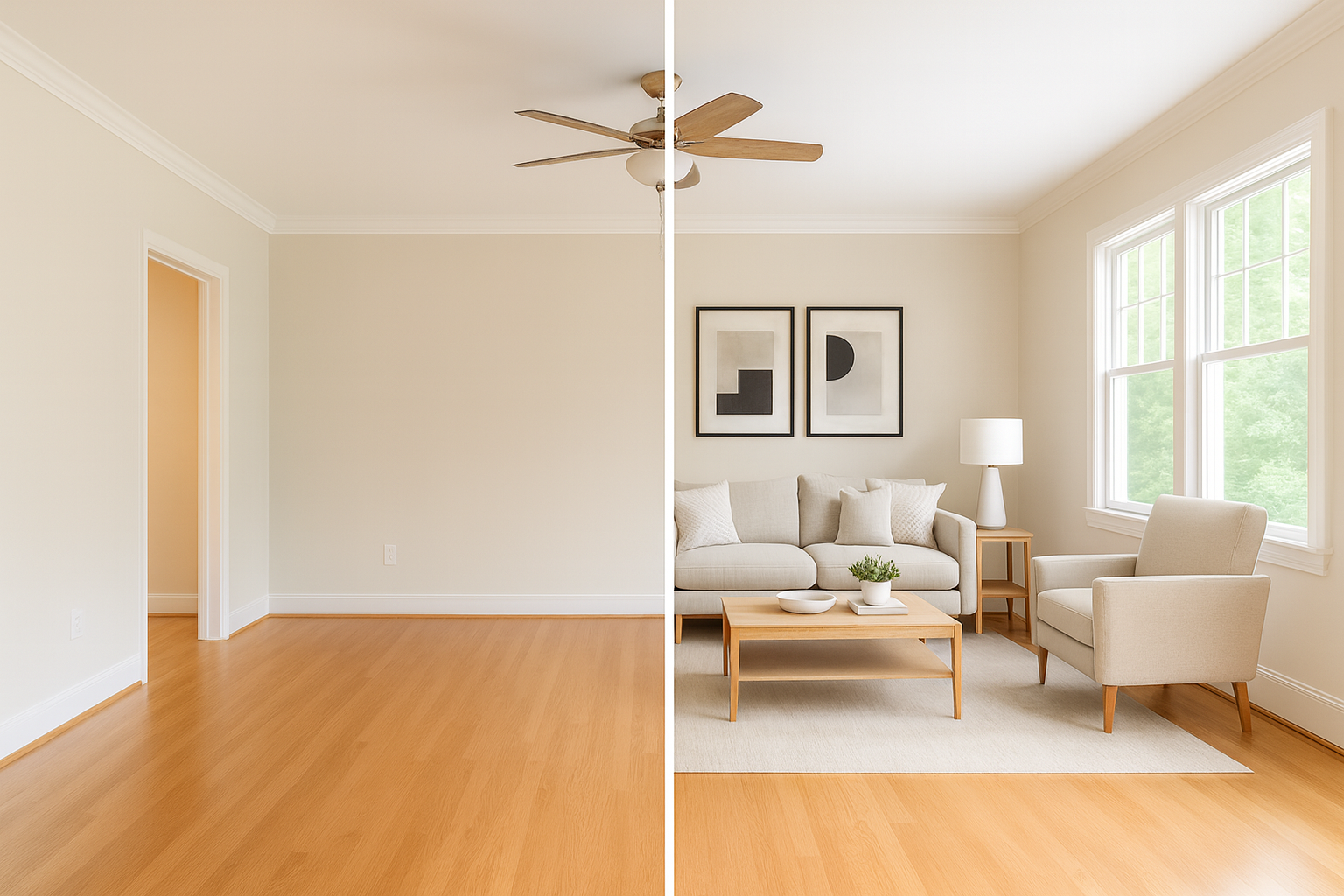
Virtual staging software is used to add furniture to empty property photos so the space feels understandable at a glance. The purpose is not visual styling. It is about showing how a room can realistically be used, where furniture fits, and how people move through the space.
How It Is Applied to Listing Photos
A clear listing image is uploaded and reviewed for perspective and proportions. Furniture is then placed to match wall lengths, floor depth, and camera position. Chairs, tables, and beds are sized to avoid exaggerating or shrinking the room.
Where It Fits in Real Estate Marketing
This type of software is built for listing distribution, not design concepts. Agents and virtual staging companies rely on it to prepare consistent images that meet MLS standards and support faster listing publication without physical staging delays.
Also Read: Master Bedroom Staging Before and After
Why Virtual Staging Software Matters for Real Estate Listings
How Buyers Actually Judge Listings
When buyers scroll through listings, they are not analysing features line by line. They are reacting to space. A room that looks usable gets attention. A room that feels unclear gets skipped. Virtual staging software helps remove that uncertainty by showing how furniture fits, how much space remains, and how the room is meant to function.
What It Changes for Listing Timelines
Physical staging depends on access, delivery, and coordination. With virtual staging software, images are prepared once photography is done. Listings can be published without waiting for on site changes.
Visual Consistency Across Platforms
Listings appear on MLS systems and multiple portals at the same time. Virtual staging software keeps scale and layout consistent, which helps agents and virtual staging companies manage inventory without visual confusion.
Key Features to Look for in Virtual Staging Software
Room Fit and Visual Credibility
The first thing to check is whether the room still looks truthful. The software should match furniture placement to the actual room layout, including how walls, windows, and camera height appear in the photo. Furniture that feels oversized or oddly placed can create false expectations during in person viewings.
Furniture That Reflects Real Listings
Staging libraries work best when they mirror how homes are commonly presented. The best virtual staging software focuses on neutral sofas, beds, and tables sized for standard residential layouts. Clear walk paths and sensible spacing matter more than decorative detail.
Control During Listing Changes
Listings are edited frequently. Virtual staging software should allow adjustments without rebuilding the image. Being able to replace furniture or tweak layout scale saves time when descriptions, pricing, or target buyers change.
Image Output for Distribution
Images must upload cleanly across MLS systems and portals. Tools used by virtual staging companies preserve resolution and color so listings remain consistent everywhere they appear.
Also Read: Staging Wall Art Ideas
AI Capabilities and Automation in Virtual Staging Software
Scene Recognition and Depth Handling
When a photo is uploaded, virtual staging software tries to understand the room before anything is added. It reads the way the floor settles into the frame, how the walls taper toward the camera, and where the natural break in the room sits. If this first pass is wrong, the whole image feels off, so the software spends most of its effort figuring out the depth and the angle before placing even a single object.
Automated Object Placement Logic
Placement follows simple, practical habits rather than decorative instincts. A bed goes where someone would actually sleep. A sofa is arranged so people can move around it without squeezing through a narrow gap. Tables are adjusted so they do not overpower the room. The best virtual staging software keeps these rules in mind so the final image looks workable, not staged for effect.
Time and Volume Efficiency
Automation shows its value when several listings need to be prepared at once. Agents and virtual staging companies can load a batch of photos, review them, and make quick fixes without rebuilding everything. This keeps the visual style steady across all images and helps avoid delays when listings are about to go live.
Pricing Models Used by Virtual Staging Companies
How Image-Based Pricing Works
Many virtual staging companies charge by the finished image. The cost usually shifts with the room type and the amount of furniture needed. This setup feels straightforward for agents who stage only a few rooms because they know exactly what each photo will cost before moving ahead with the listing.
Subscription and Credit Systems
Some platforms offer monthly plans or credit bundles rather than charging for each image. This setup suits teams that handle listings regularly and need predictable costs. Tools built this way focus on quick preparation and consistent results, which helps when several properties need to be staged at the same time using the same virtual staging software.
What Affects the Final Price
Faster turnaround, higher resolution exports, and revision requests can all shift the total cost. Agents pay attention to these details because a delayed image can interrupt a planned listing release and create unnecessary back-and-forth during preparation.
Also Read: Staging Wall Art Ideas
How to Evaluate and Choose the Best Virtual Staging Software
Start With a Test Image
The simplest way to judge virtual staging software is to try it on one room that you know well. Look at how the furniture settles into the corners and how it follows the lines of the floor. If the scale feels wrong or the pieces lean in strange directions, the tool will not improve with more images.
Check How It Handles Revisions
Listings rarely stay the same from week to week. A useful platform lets you adjust furniture without rebuilding the whole scene. Moving a chair, changing the angle of a sofa, or swapping a table should feel manageable, not like starting over.
Match the Tool to Your Workload
Some agents want hands-on control. Others need quick results across several properties. The best virtual staging software is the one that fits your pace and gives you steady, clean images without a long learning curve.
Conclusion
Choosing the right virtual staging software comes down to how well the tool reads a room and how reliably it supports the pace of your listing work. The software should help buyers understand the layout without altering the structure, and it should give you steady results whether you are preparing one property or several at once. When the images feel natural and the workflow stays predictable, the staging becomes part of the listing strategy instead of something you need to manage on the side.
Work With a Team That Knows the Process
Deco prepares staging that looks lived-in, measured, and ready for MLS release. If you want to list images that match the pace and polish your workflow demands, Deco can handle the staging for you.
FAQs
1. Does virtual staging affect how buyers judge room size?
It shapes how people read the layout, but it should not exaggerate the room. Good staging leaves the true proportions clear.
2. Is a disclosure needed when photos are virtually staged?
Most listing systems ask for a short note. It helps buyers recognise the furniture is added and the room itself has not been altered.
3. Can virtual staging help when a home is partially furnished?
It can, but the original items usually need to be removed in the photo first. Clean images lead to clearer and more believable results.
Ready to transform your listings?
Experience the power of AI-driven virtual staging with Deco.


